
Most people fail AWS Cloud Practioner Exam for one reason: they memorised service descriptions instead of service distinctions.
The exam almost never asks “what is Amazon Macie?” It asks: “A company needs to automatically discover sensitive data in S3.” Four services sound plausible. Only one is right.
So I built a 25-infographic visual guide from ~300+ real practice questions and compressed the whole thing into this post. No fluff. Just the distinctions that decide your score.
1. Know the Battlefield First
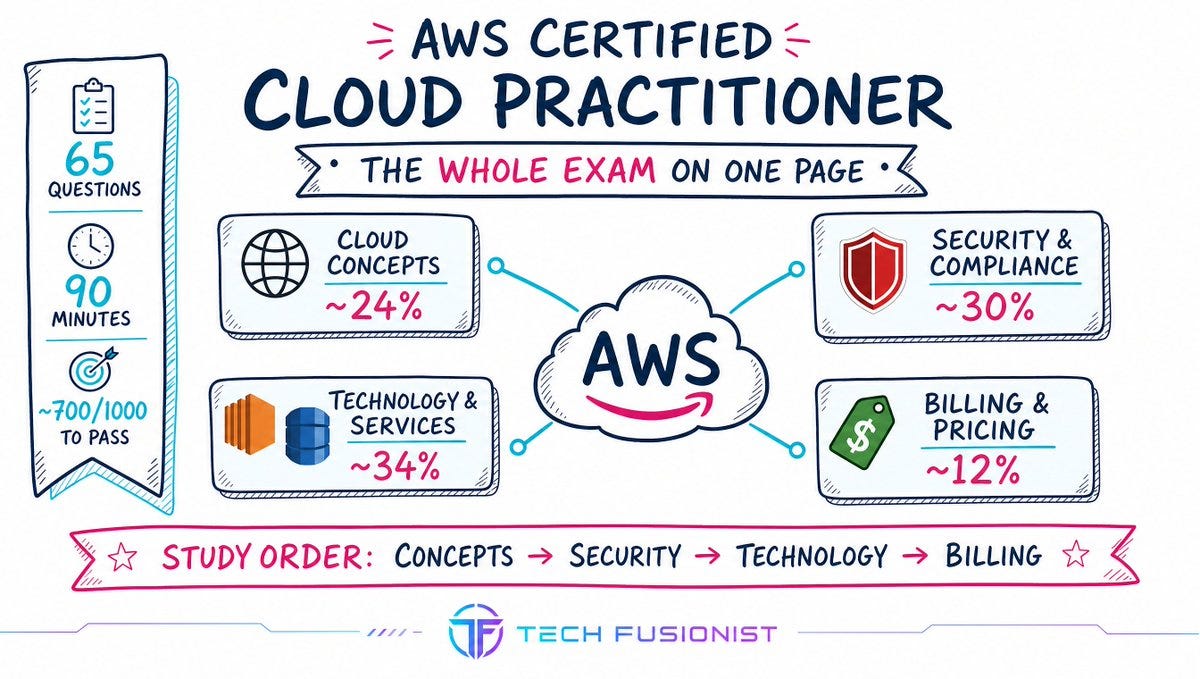
The exam is 65 questions, 90 minutes, ~700/1000 to pass. Four domains:
Cloud Concepts — the why
Security & Compliance — the who owns what
Technology & Services — the biggest chunk, the which service
Billing & Pricing — the how much
Study in this order. Concepts → Security → Technology → Billing. Each layer depends on the one before it.
2. Global Infrastructure: Three Words That Trip Everyone
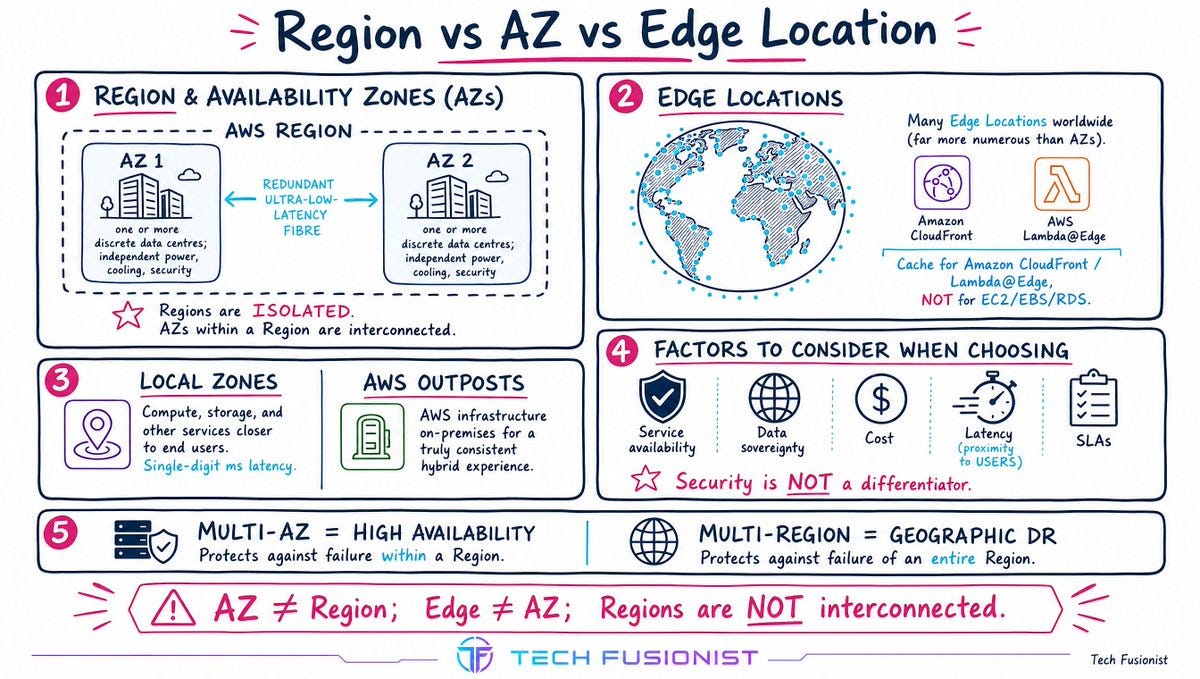
Region = a geographic cluster of data centres. Regions are isolated from each other - that’s the fault-tolerance design.
Availability Zone (AZ) = one or more discrete data centres inside a Region, with independent power, cooling and security, connected by redundant ultra-low-latency fibre. AZs within a Region are interconnected.
Edge Location = a caching site for CloudFront and Lambda@Edge. Far more numerous than AZs. You do not deploy EC2/EBS/RDS here.
Two more you must recognise: Local Zones (compute closer to users, single-digit ms) and Outposts (AWS hardware on your premises, the hybrid answer).
The mapping that earns points:
Multi-AZ → High Availability
Multi-Region → geographic Disaster Recovery
Choosing a Region? Service availability, data sovereignty, cost, latency to users, SLAs. Not “closest to my house.” Not “which is most secure” — all Regions are highly secure.
3. Well-Architected: Five Pillars, One Quick-Match Table
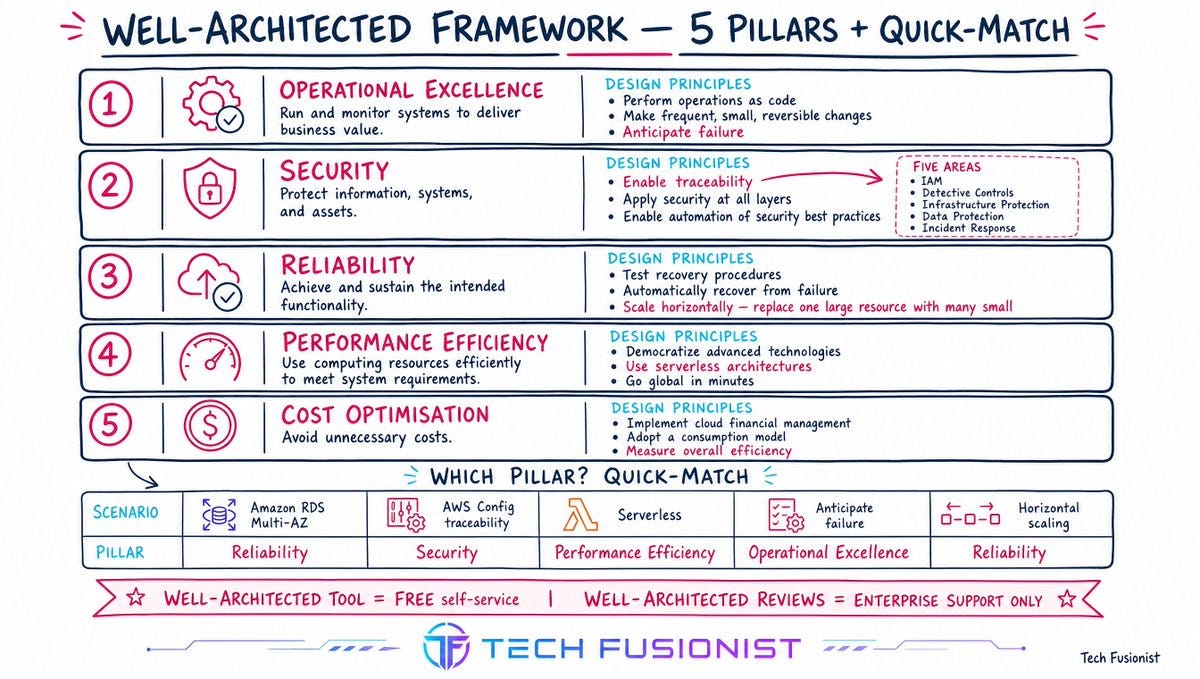
You don’t need the whitepapers. You need to map a scenario to a pillar in three seconds:
ScenarioPillarRDS Multi-AZ deploymentReliabilityAWS Config for traceabilitySecurityGo serverlessPerformance Efficiency“Anticipate failure”Operational ExcellenceScale horizontallyReliabilityMeasure overall efficiencyCost Optimisation
Security has five areas: IAM, Detective Controls, Infrastructure Protection, Data Protection, Incident Response.
And the trap: Well-Architected Tool = free, self-service. Well-Architected Reviews = Enterprise Support only.
4. Cloud Economics & Scaling Vocabulary
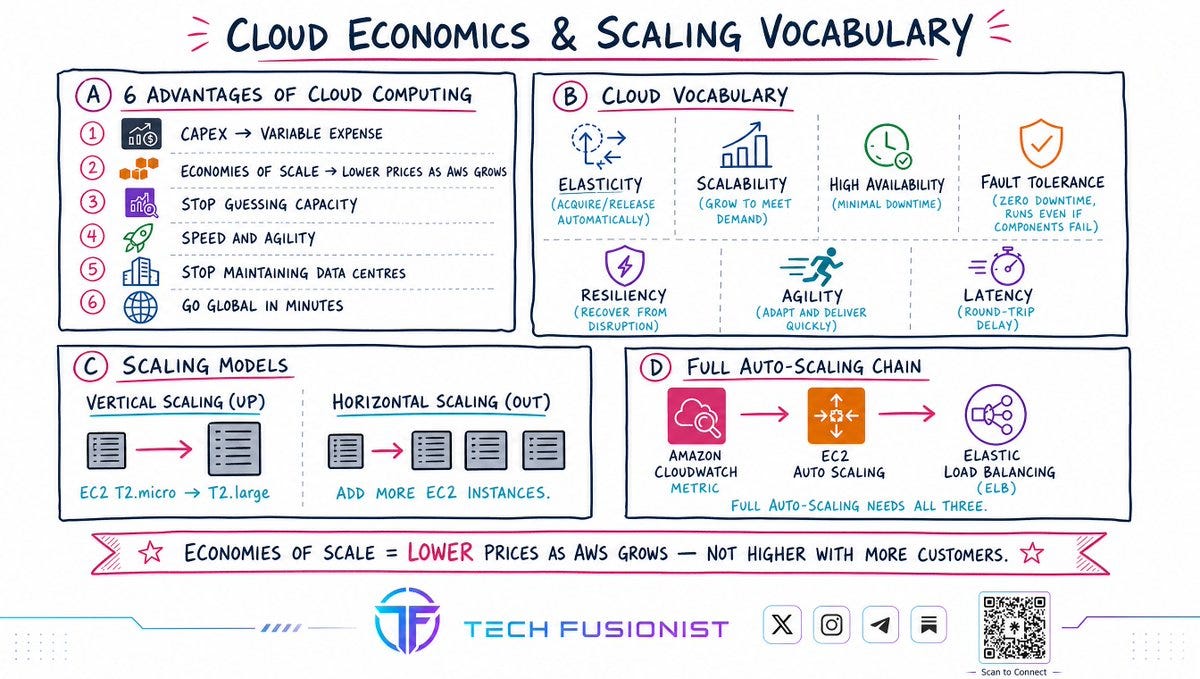
The six advantages (memorise as a list - they get quoted verbatim):
Trade capital expense for variable expense
Benefit from massive economies of scale
Stop guessing capacity
Increase speed and agility
Stop spending on running data centres
Go global in minutes
Economies of scale = AWS aggregates millions of customers → lower pay-as-you-go prices. This is why AWS keeps cutting prices. It is not “prices rise as customers join.”
The vocabulary that gets weaponised in questions:
Elasticity — acquire and release automatically (fixes idle on-prem hardware)
Scalability — grow to meet demand
High Availability — minimal downtime
Fault Tolerance — zero downtime, keeps running even when components die
Resiliency — recover from disruption
Agility — ship faster
Latency — round-trip delay
Vertical scaling = bigger machine (T2.micro → T2.large). Horizontal scaling = more machines.
Full auto-scaling needs three services together: EC2 Auto Scaling + ELB + CloudWatch. Auto Scaling alone can’t do it - it needs metrics to react to.
5. Shared Responsibility & IAM: The Highest-Yield Pages
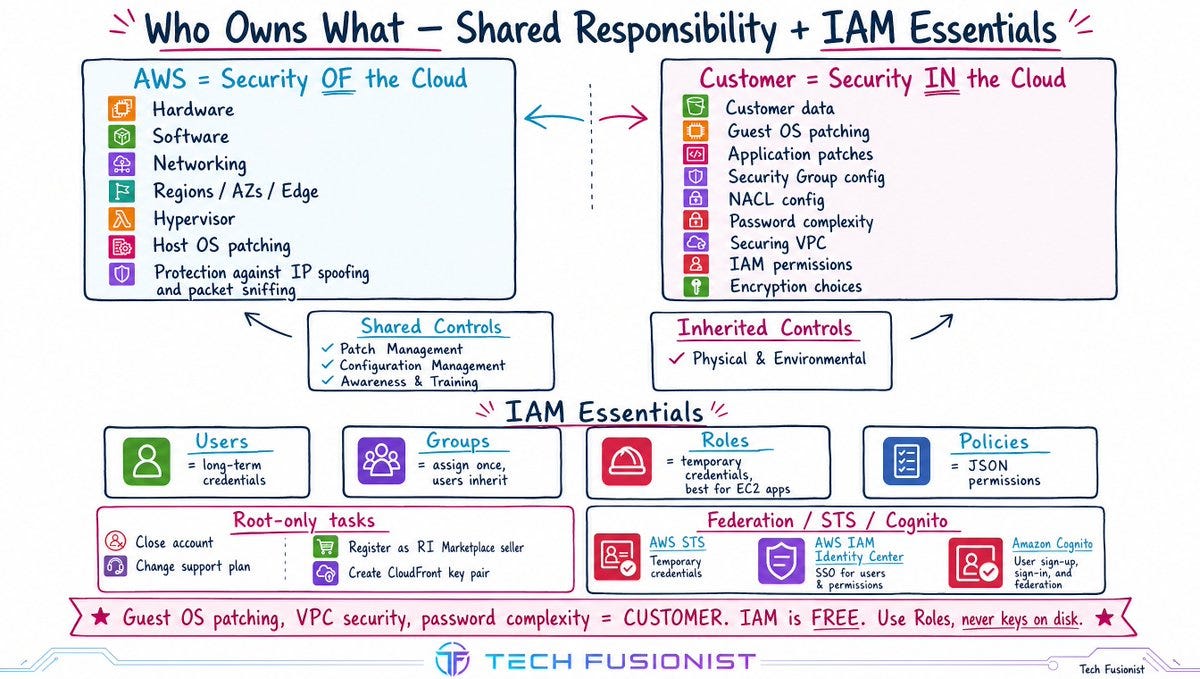
AWS = Security OF the cloud. Hardware, hypervisor, host OS patching, physical facilities, Regions/AZs/Edge, protection against IP spoofing and packet sniffing.
You = Security IN the cloud. Your data, guest OS patching, app patches, Security Groups, NACLs, password complexity, securing your VPC, IAM permissions, encryption choices.
Shared controls (both, different contexts): Patch Management, Configuration Management, Awareness & Training.Inherited control (100% AWS): Physical & Environmental.
On IAM, four things decide most questions:
Roles, not access keys on disk, for EC2 apps calling other AWS services. Always.
Password complexity = IAM account password policy. Not a user policy. Not an SCP.
Root-only tasks: close the account, change support plan, register as RI Marketplace seller, create a CloudFront key pair. Delete root access keys, enable MFA on root.
Federation = corporate directory sign-in. STS = temporary credentials. Cognito = web/mobile app sign-in.
IAM itself is free.
6. The Security Service Matrix (Where Most Marks Are Lost)
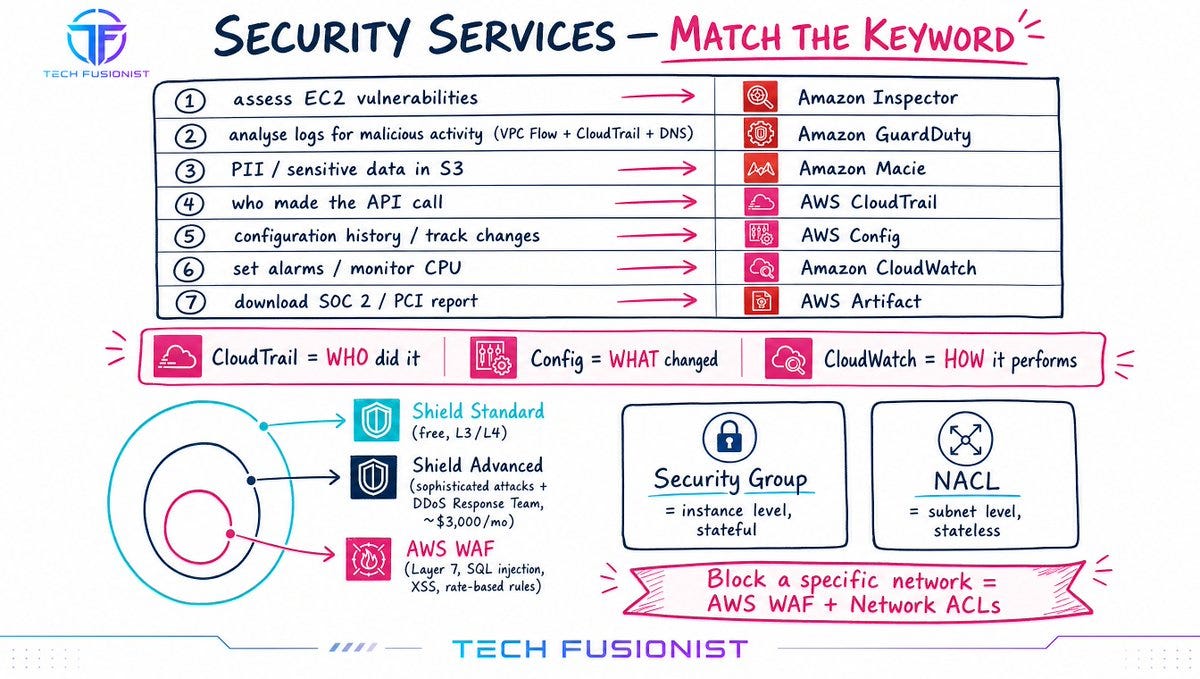
Learn these by trigger keyword, not description:
Keyword in questionAnswer”assess EC2 vulnerabilities / network exposure”Amazon Inspector“analyse logs for malicious activity” (VPC Flow + CloudTrail + DNS)Amazon GuardDuty“sensitive data / PII / credit cards in S3”Amazon Macie“who made the API call / unauthorised API calls”AWS CloudTrail“resource configuration history / track changes”AWS Config“set alarms / monitor CPU”Amazon CloudWatch“download SOC 2 or PCI report”AWS Artifact
The three-way you must never fumble: CloudTrail = WHO did it. Config = WHAT changed. CloudWatch = HOW it performs.
Defence layers: Shield Standard (free, L3/L4 DDoS) → Shield Advanced (sophisticated attacks + DDoS Response Team, ~$3,000/mo) → WAF (Layer 7, SQL injection, XSS, rate-based rules).
NACL = subnet level, stateless. Security Group = instance level, stateful. Block traffic from a specific network? WAF + NACL.
Encryption: KMS = managed keys. CloudHSM = dedicated hardware appliance. ACM = SSL/TLS certificates. Secrets Manager = credentials.
Pen testing: 8 services allowed without approval (EC2/NAT/ELB, RDS, CloudFront, Aurora, API Gateway, Lambda, Lightsail, Elastic Beanstalk). Never allowed: DNS zone walking, any DoS/DDoS - real or simulated and testing AWS’s own infrastructure.
7. Core Services: Match the Scenario, Not the Name
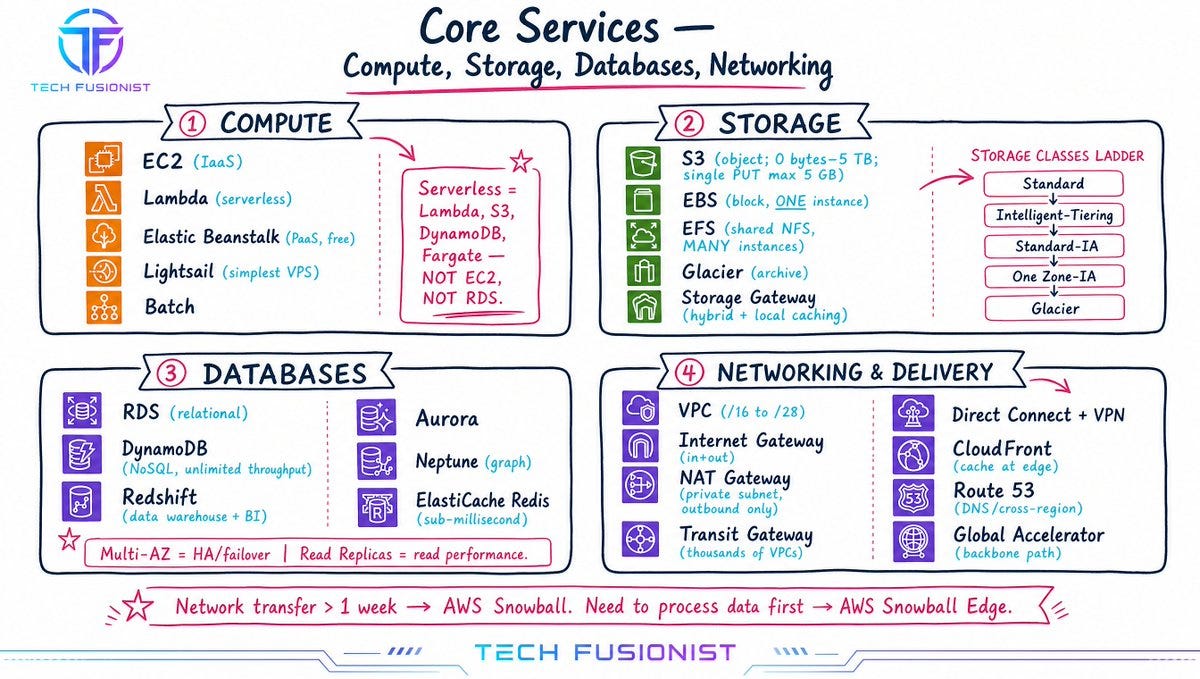
Compute: EC2 (IaaS) · Lambda (serverless) · Elastic Beanstalk (PaaS, free pay only for resources) · Lightsail (simplest VPS) · Batch (batch jobs). Serverless = Lambda, S3, DynamoDB, Fargate. Not EC2. Not RDS.
Storage: S3 (object, 0 bytes–5 TB, single PUT max 5 GB) · EBS (block, one instance) · EFS (shared NFS, manyinstances) · Glacier (archive) · Storage Gateway (hybrid + local caching). S3 classes: Standard → Intelligent-Tiering (auto-moves across 4 tiers) → Standard-IA → One Zone-IA (single AZ, 20% cheaper, lower resiliency) → Glacier/Deep Archive.
Databases: RDS (relational) · DynamoDB (NoSQL, unlimited throughput) · Redshift (data warehouse + BI) · Aurora · Neptune (graph) · ElastiCache (Redis = sub-millisecond). Multi-AZ = HA + failover. Read Replicas = read performance. Different problems, different answers.
Networking: VPC CIDR /16 to /28 · IGW (inbound+outbound) · NAT Gateway (private subnet → internet, outbound only the “install patches securely” answer) · VPC Peering (one-to-one) · Transit Gateway (thousands of VPCs, hub-and-spoke) · Direct Connect + VPN (extend on-prem).
Global delivery: CloudFront = cache at edge. Route 53 = DNS + cross-region routing. Global Accelerator = AWS backbone path optimisation, 2 static anycast IPs.
Data transfer rule of thumb: if network transfer would take more than a week → Snowball. Need to process data before storing → Snowball Edge.
8. Billing, Support & the Traps That Decide Your Pass
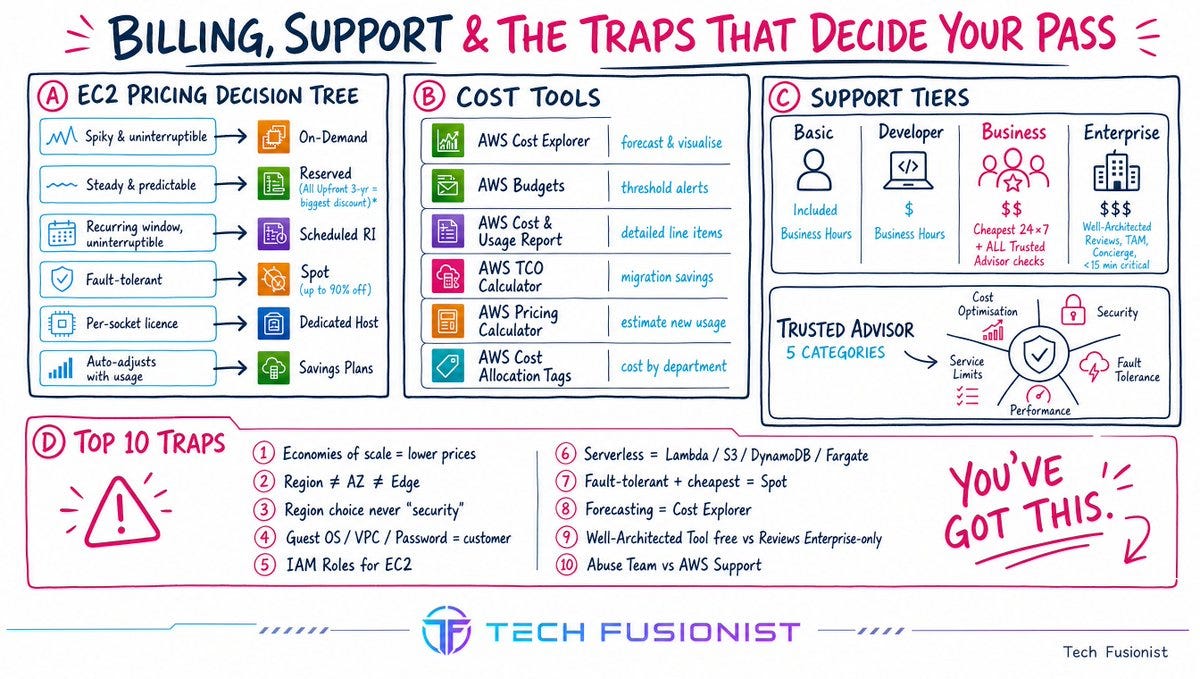
EC2 pricing decision tree:
Spiky, unpredictable, can’t be interrupted → On-Demand
Steady and predictable → Reserved (All Upfront 3-yr = biggest discount)
Recurring window, uninterruptible (Friday-night batch) → Scheduled RI
Fault-tolerant, recovers gracefully → Spot (up to 90% off)
Per-socket/per-core licence → Dedicated Host
Want flexibility that auto-adjusts with usage → Savings Plans
Cost tools - one job each:
Cost Explorer → visualise and forecast
Budgets → alert at a threshold
Cost & Usage Report → the most detailed line items
TCO Calculator → migration savings vs on-prem
Pricing Calculator → estimate new workloads
Tags → attribute cost by department/project
Support plans: Business is the cheapest with 24×7 phone/chat/email and all Trusted Advisor checks. Enterprise-only: Well-Architected Reviews, TAM, Concierge Team, <15 min critical response.
Trusted Advisor’s five categories: Cost Optimisation, Security, Fault Tolerance, Performance, Service Limits. Seven checks are free; the full set needs Business/Enterprise.
Organizations: consolidated billing (one bill, combined usage → shared volume/RI discounts, no extra fee) + SCPs to restrict services/APIs in member accounts. Turn RI sharing off to keep a discount inside one account.
The Ten Traps Worth Re-Reading the Morning Of
Economies of scale = lower prices as AWS grows
Region ≠ AZ ≠ Edge Location; Regions are not interconnected
Region choice = users, compliance, cost, latency; never “security”
Guest OS patching, VPC security, password complexity = customer
IAM Roles for EC2 → other services, never stored keys
Serverless = Lambda, S3, DynamoDB, Fargate
Fault-tolerant + cheapest = Spot
Forecasting = Cost Explorer, not Budgets
Well-Architected Tool is free; Reviews are Enterprise-only
Malicious resource use → Abuse Team. Account compromised → AWS Support
How to Actually Use This
Week 1 concepts. Week 2 security. Week 3 technology. Week 4 billing plus full practice sets.
Then, the day before: re-read only the distinctions. CloudTrail vs Config vs CloudWatch. Inspector vs GuardDuty vs Macie. NACL vs Security Group. Multi-AZ vs Read Replica. Shield vs WAF. CloudFront vs Global Accelerator vs Route 53.
That’s the exam. Everything else is context.
You’ve got this.
Found it helpful, then Like & share with your friend to through visualised content!
🔗 Linkedin: https://www.linkedin.com/company/vega-orbit
Related articles
How to use AI agents better than 99% of people
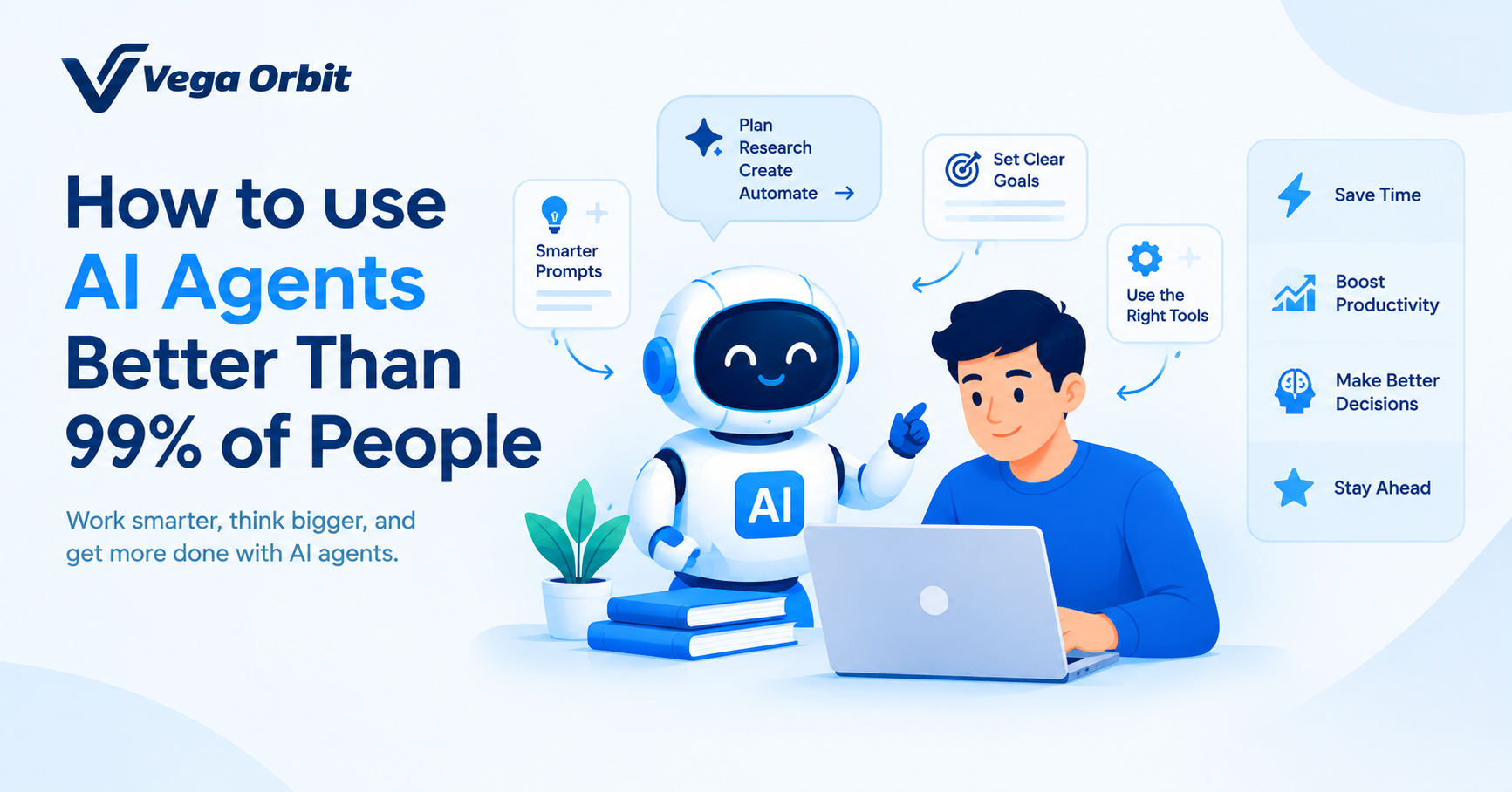
Most people use AI for simple answers, but AI agents can do much more. Discover how to write smarter prompts, automate complex tasks, choose the right tools, and use AI agents to boost productivity and achieve better results.
Realtime AI Agent - A Deep Dive
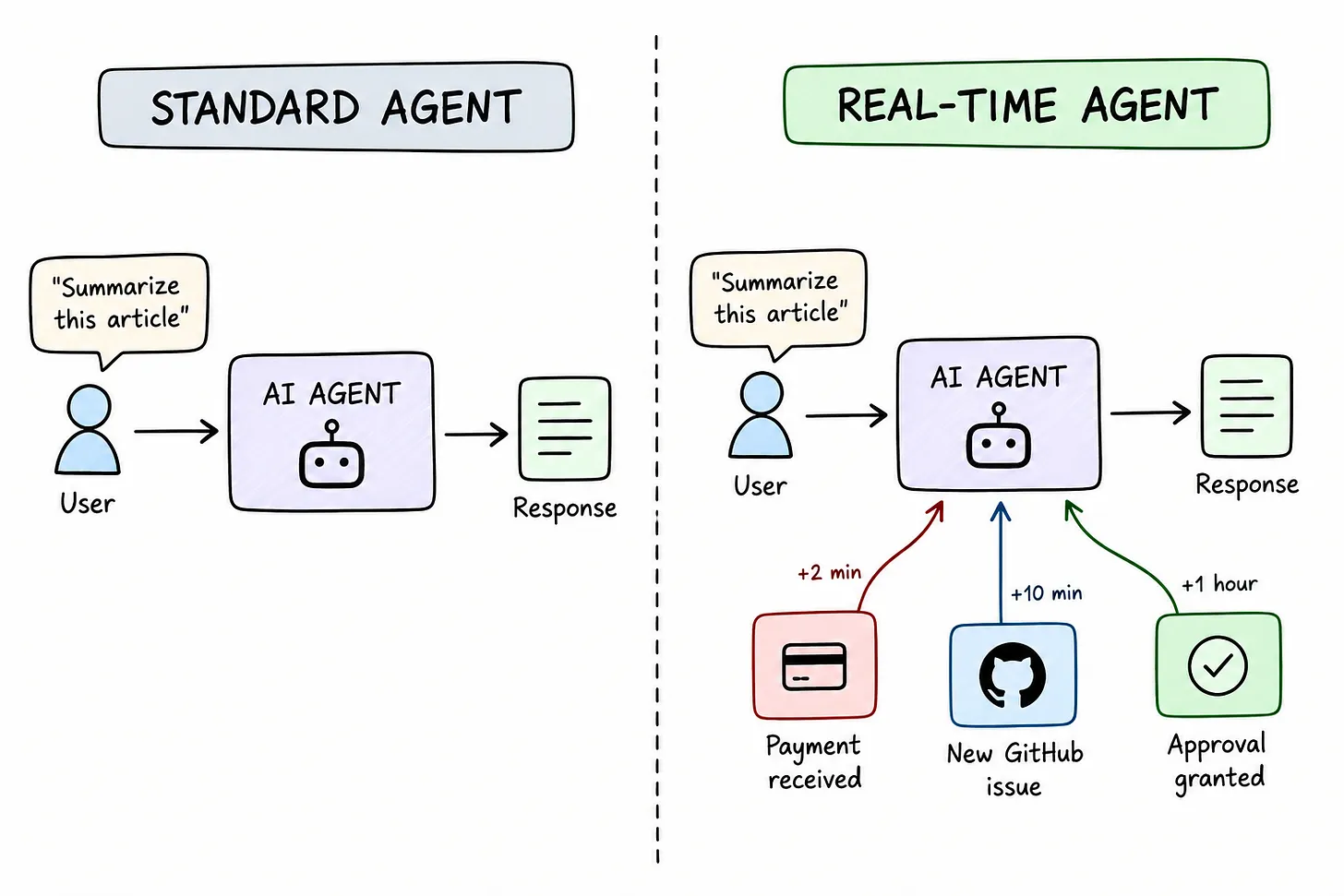
Learn how real-time AI agents use event-driven architecture, webhooks, and reliable event delivery to build responsive, scalable AI workflows.
Introduction to Load Balancing
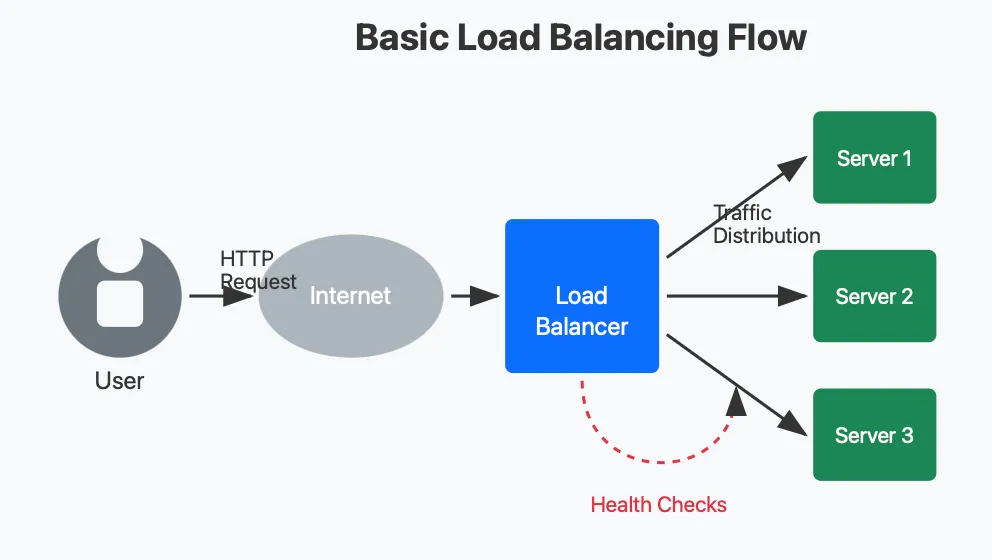
Discover how load balancing distributes traffic across servers, explore popular algorithms like Round Robin and Least Connections, and learn how they improve scalability and reliability.