If you’ve used an AI agent1, you’d have noticed how much it can do on its own…
Give it a task; it calls a few tools, then keeps going without you guiding every step.
But agents still are NOT good at one thing: waiting.
An agent would wait for someone to approve a request, a payment to go through, a deployment to finish, or a customer to reply. The agent has done its part, but what it’s waiting for might happen seconds later or not until tomorrow…
It could keep checking for an update every few seconds, but this’d become “wasteful” pretty quickly. i.e., the agent is still doing nothing except asking whether anything has changed.
A better approach is to let the system send an event when the change actually occurs. So the agent does not need to keep asking & continues the workflow when the event arrives.
This is where “webhooks2” become useful.
It lets one system notify another when something happens, and it's been running behind many apps you use daily, long before AI agents needed it.
Now apply that to everything an agent would wait on: payments, deployments, customer replies, or human approval.
Plus, handling one of these events is easy. Yet handling thousands of them reliably across different customers & external systems gets extremely HARD…
In this newsletter, we’ll use Svix as a case study & look at how it solves this problem.
(Svix is a webhook infrastructure platform for reliable event delivery.)
What Is a Real-Time AI Agent
What changes with a real-time agent is not how it thinks, but what it hears.
Let’s start with what an agent needs before getting into real-time…
Agent Fundamentals
Agents (real-time or not) run on these same parts:
A Large Language Model (LLM) does the actual reasoning.
A decision loop lets it plan a step, take it, check the result, and decide what comes next.
Tools & integrations let it act beyond generating text, such as sending requests, running commands, and/or calling APIs.
State tracks where it is in a task, so it doesn’t lose the thread halfway through.
Without these pieces, you’re getting closer to a simple model response than an agent that can carry out a task.
Real-time is the layer on top of this…
What Makes an Agent Real-Time
A typical agent workflow starts when you give it a task.
It works through steps, uses whatever tools it needs & eventually finishes…
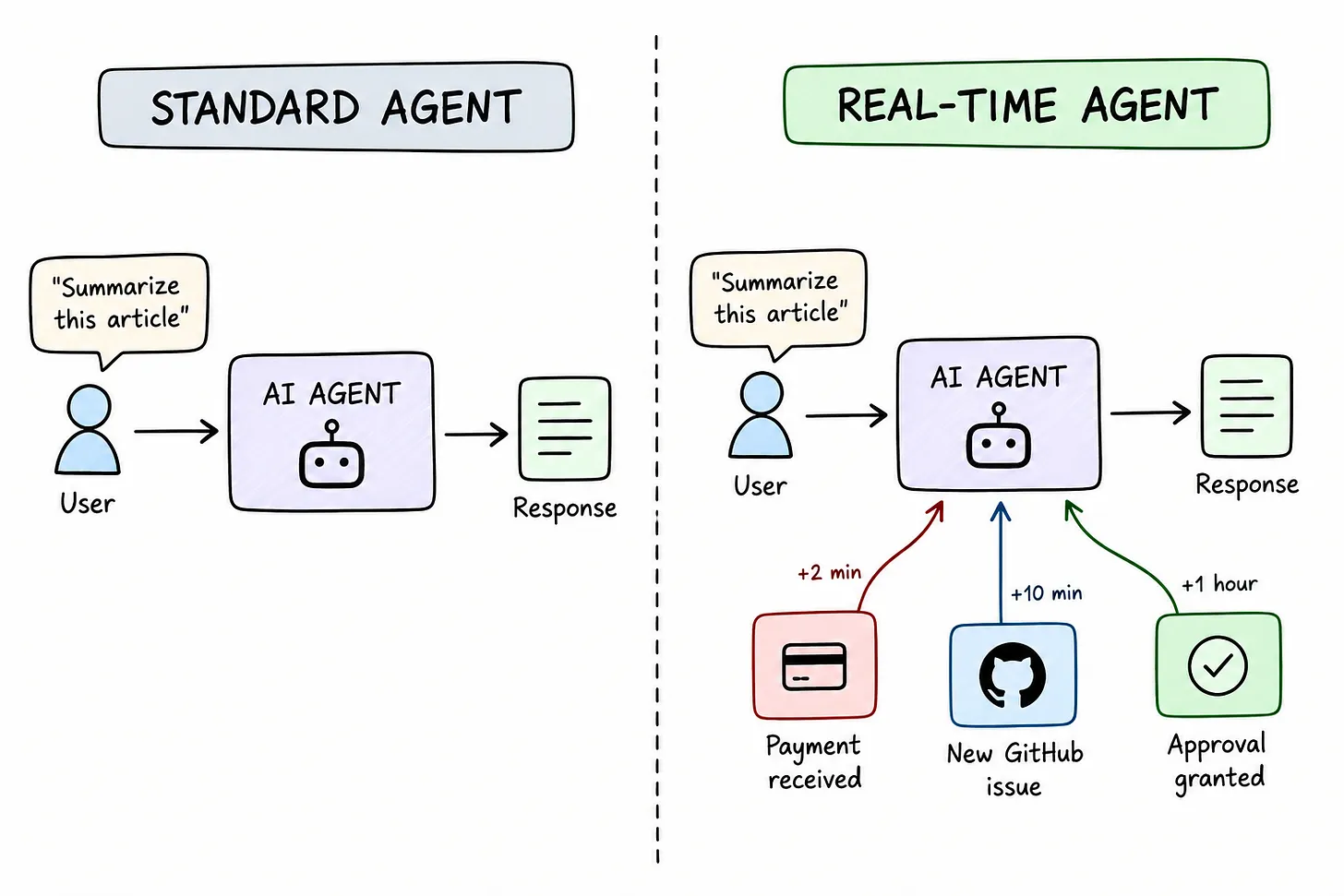
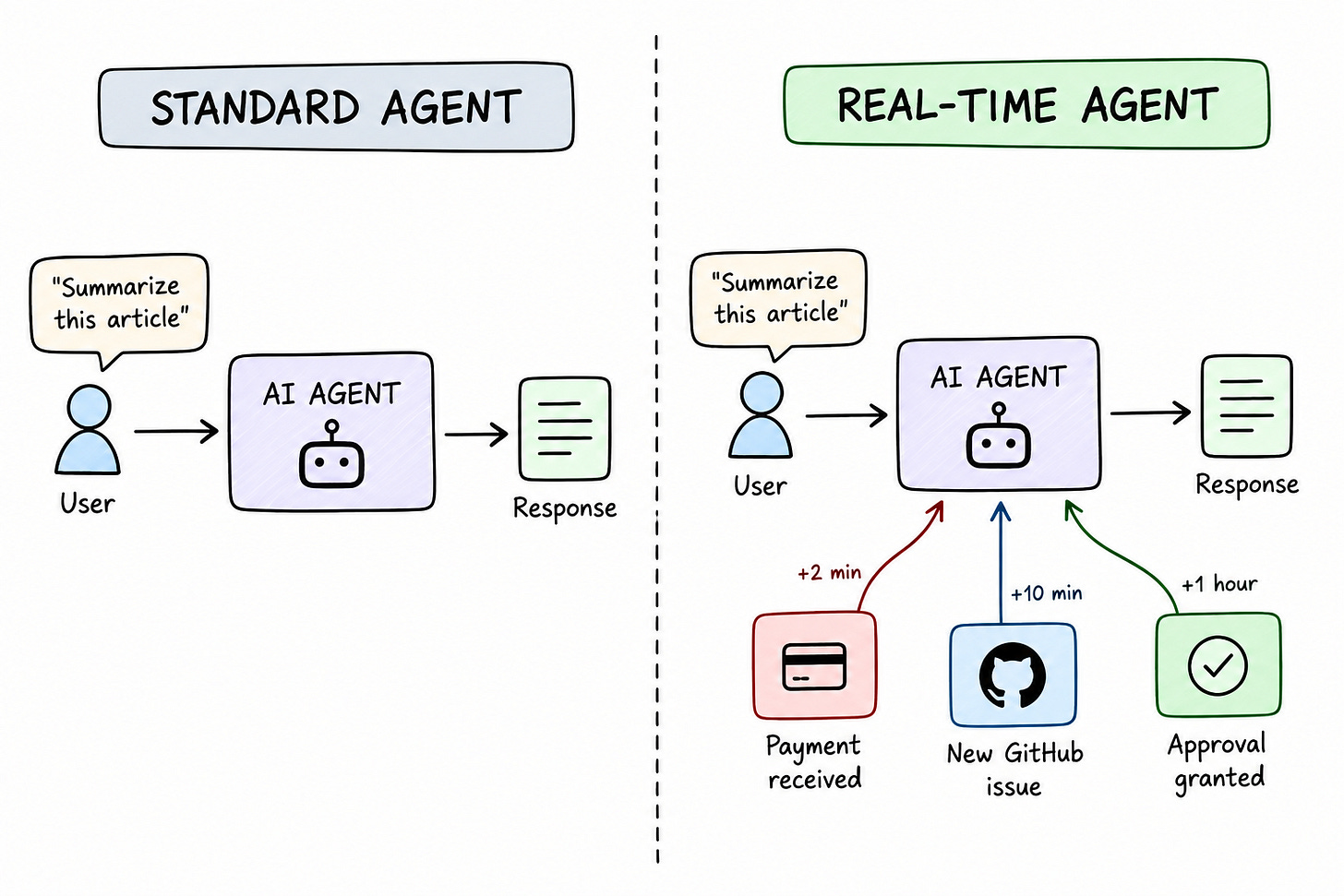
With a real-time agent, the work doesn’t end there. An external event could arrive after the original run ends, and the agent needs to resume the workflow when it does.
A payment could clear somewhere in the background a few minutes after the agent finished its original task. Instead of waiting for you to come back & tell it, the agent could receive the event5 and continue the workflow on its own.
It can pick a workflow back up without another prompt from you. Nobody needs to open a new chat/type anything. An agent does the asking instead.
And it can act on something arriving well after the original task ended. The original agent run might already be complete by the time the event arrives, and the agent still has to do something with it.
Also this brings up “latency”…
A real-time agent is NOT necessarily instant.
Latency occurs at several points in the workflow:
Network adds some delay,
Model takes time to reason,
Tools & external APIs take time to respond.
So when we talk about a real-time agent, we’re really talking about keeping the entire path “responsive”, not just getting a fast response from the model.
If you put these together, a real-time agent isn’t just running one job well. It’s also sitting ready for whatever comes in later, on somebody’s schedule.
Now let’s look at how these pieces actually work together inside the agent…
Real-Time AI Agent Architecture
A real-time agent is not one piece of code that does everything.
Instead, it’s a handful of layers, each with a different job…
The model handles the reasoning, deciding what to do next based on what it currently knows. Everything else in the agent supports this decision. It takes in input, takes action, and catches external events as they happen.
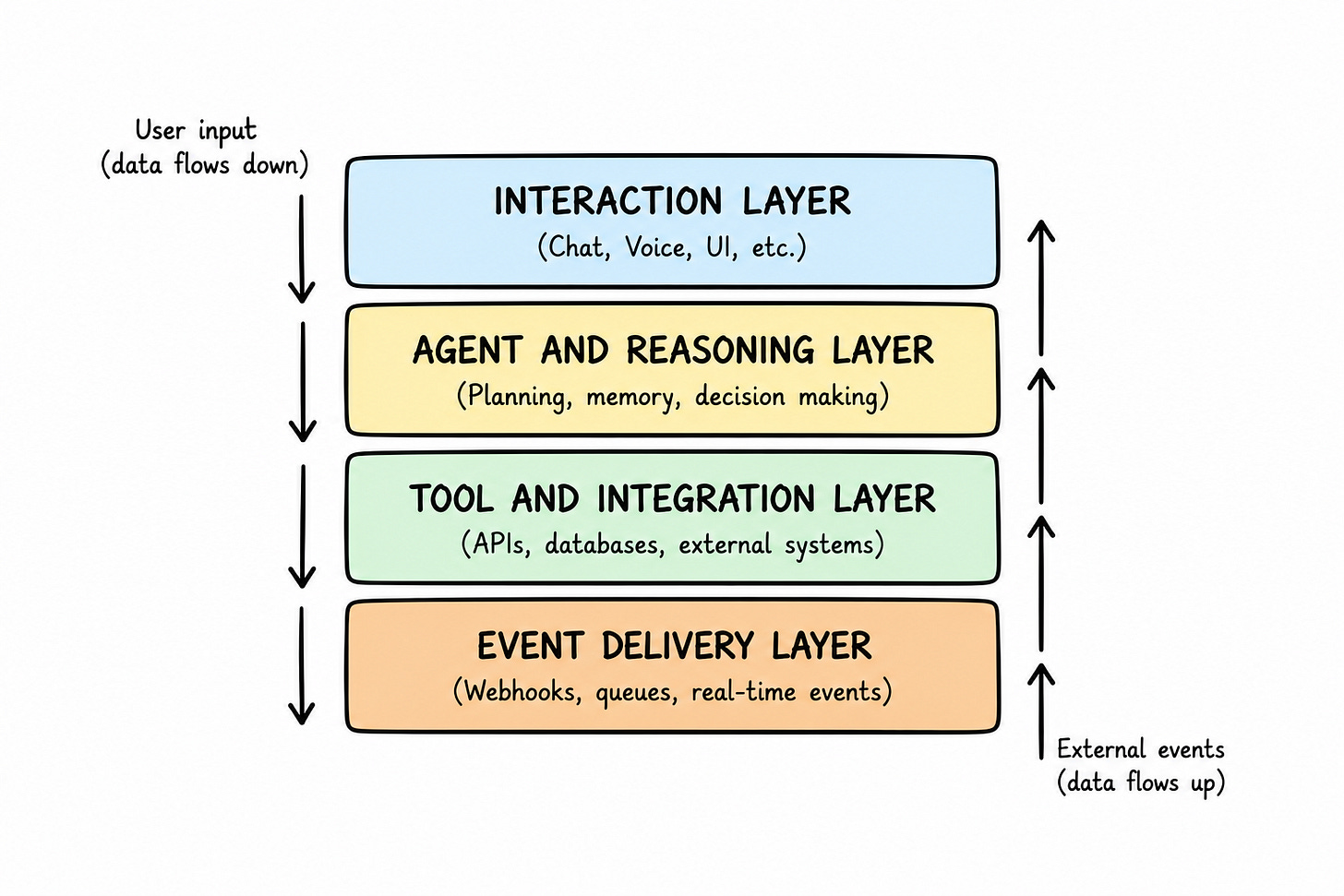
Here’s what each layer does:
Interaction: Receives input from you/another system.
Agent & reasoning: Runs the model & its decision loop.
Tool & integration: Performs actions on external systems.
Event delivery: Brings external events into agent workflow.
The agent & reasoning layer runs the model and its decision loop.
The other layers support it by bringing in input, carrying out actions & delivering external events.
Synchronous vs Asynchronous Workflows
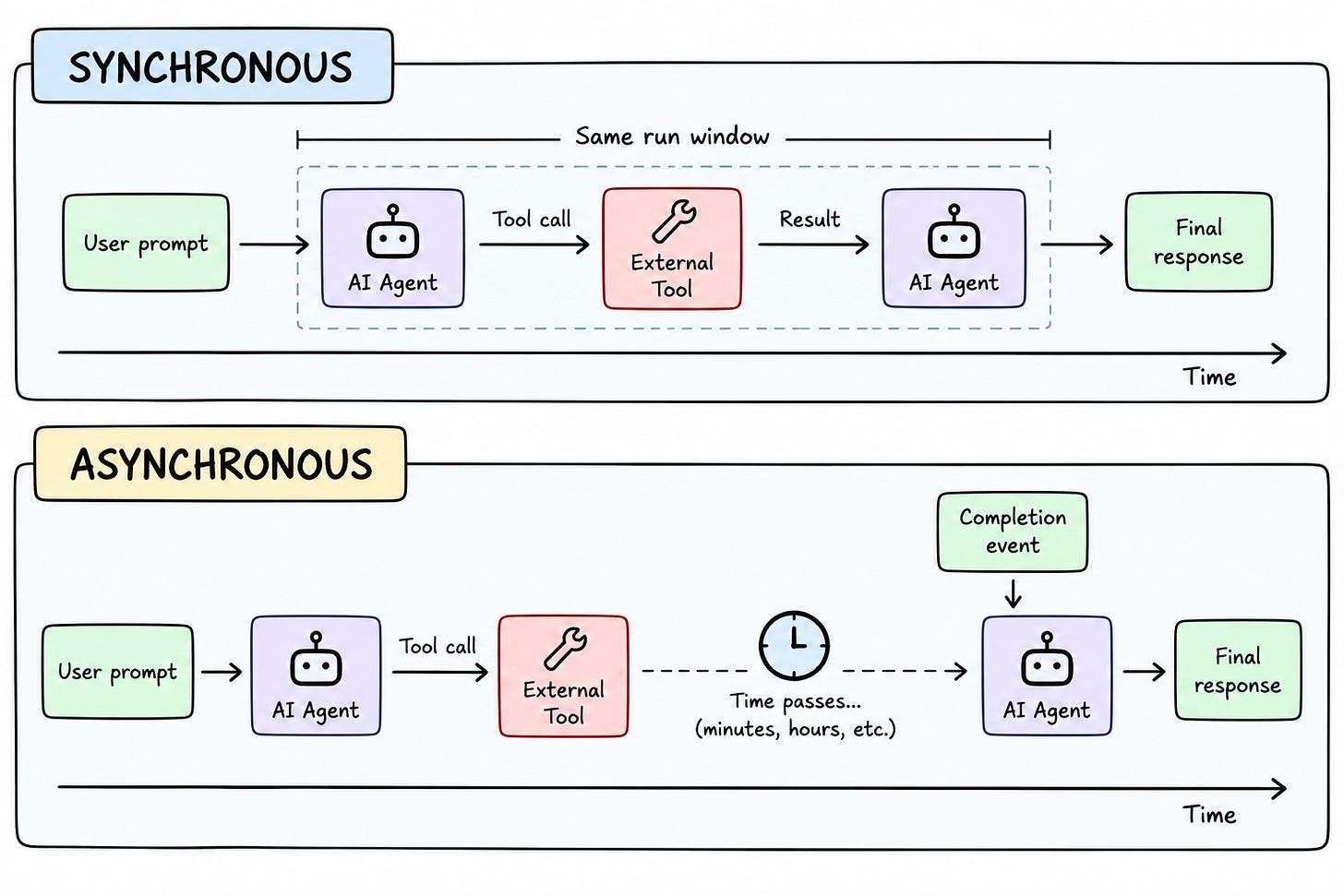
Some operations finish immediately…
Ask to look up an order status & tool call returns the result within the same run.
Other operations don't finish right away…
Processing a file could take a minute. A payment can take a few seconds to clear, sometimes longer. An approval can sit unread for two days.
Synchronous operations return their result within the same run, so the agent could use it right away. Asynchronous operations don’t, and the workflow needs to continue once the result becomes available later.
When the result becomes available, the event gets delivered to the application, which then updates/resumes the agent’s workflow.
Let’s see how the event actually reaches the agent in the first place…
How Real-Time AI Agents Connect to External Systems
When an agent needs to react to something happening in another system, a webhook is one of the simplest ways to get the event to it.
One system notifies another when something happens. i.e., the receiving side does not need to check for changes repeatedly.
Webhooks are built for “discrete” events, not continuous streams of data.
A payment clearing counts as one. So does a build finishing or an approval landing in someone’s inbox. This is exactly the kind of event an agent needs to hear about to move a workflow forward.
The idea is simple, but it helps to see what actually happens when one of these events gets sent.
So let’s look at how webhooks work...
How Webhooks Work
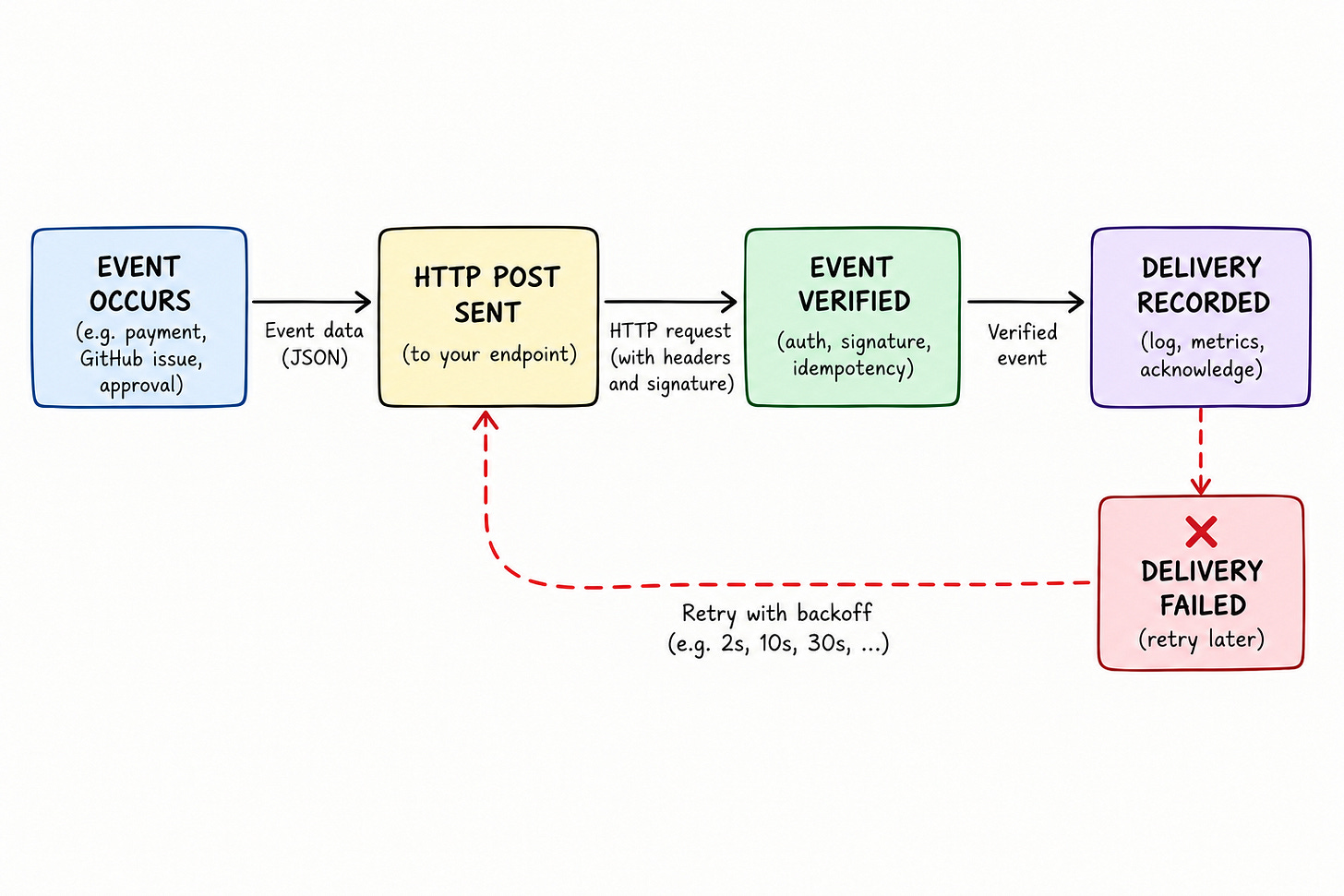
Here’s how:
An event occurs in the source system.
Source sends an HTTP POST to a configured endpoint.
The receiving application verifies the event & triggers the appropriate workflow.
Sender records6 whether delivery succeeded/failed.
Four steps, each depending on the last.
If you skip verification, anyone can send a fake event to the endpoint. Or if you skip recording the result, a failed delivery disappears without anybody noticing.
Webhooks work well for individual events, but real-time systems also deal with continuous information streams.
Streaming vs Webhooks
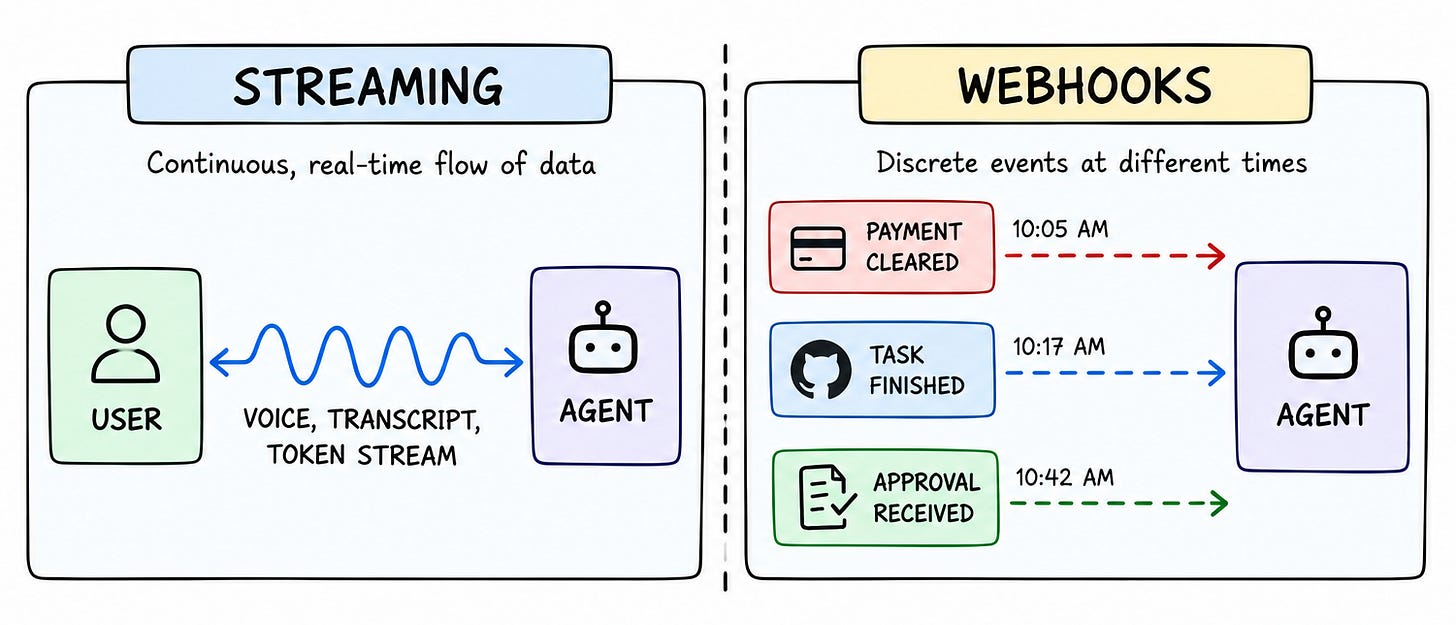
Real-time systems typically handle information in 2 ways:
It keeps flowing continuously,
Or it gets sent when a specific event happens.
Streaming is useful when information needs to keep flowing.
A voice conversation, a live transcript, or an agent response generated token by token all need a connection that can keep data flowing.
Webhooks solve a different problem.
They’re useful when something happens outside the agent, and the agent needs to know about it. The event happens once, and the system sends a notification instead of making the agent keep checking.
For real-time AI agents, both matter.
Streaming keeps the user interaction responsive.
Webhooks handle everything happening around the agent that needs a response later.
As the number of events and external systems grows, delivering those events reliably becomes hard.
Someone has to handle failed requests, retries, duplicate deliveries, and track what was delivered & what wasn’t.
Svix handles this part of the stack…It provides the infrastructure for delivering webhook events to external systems, while the application stays focused on the agent itself.
Let’s understand the challenges of running webhook infrastructure reliably…
Challenges of Building Real-Time AI Agents
A webhook integration usually works fine in testing…
You send an event, watch it arrive & everything looks good, so you move on.
Once you put it into production, things change. Servers go down mid-deploy, networks drop packets for reasons that aren’t always obvious, and traffic suddenly comes in bursts instead of at a steady rate.
None of these things are unusual in production, but they expose problems that you simply don’t see when you’re testing with a handful of events.
Most of the problems fall into a few recurring areas.
Let’s dive in!
1. Reliable Delivery
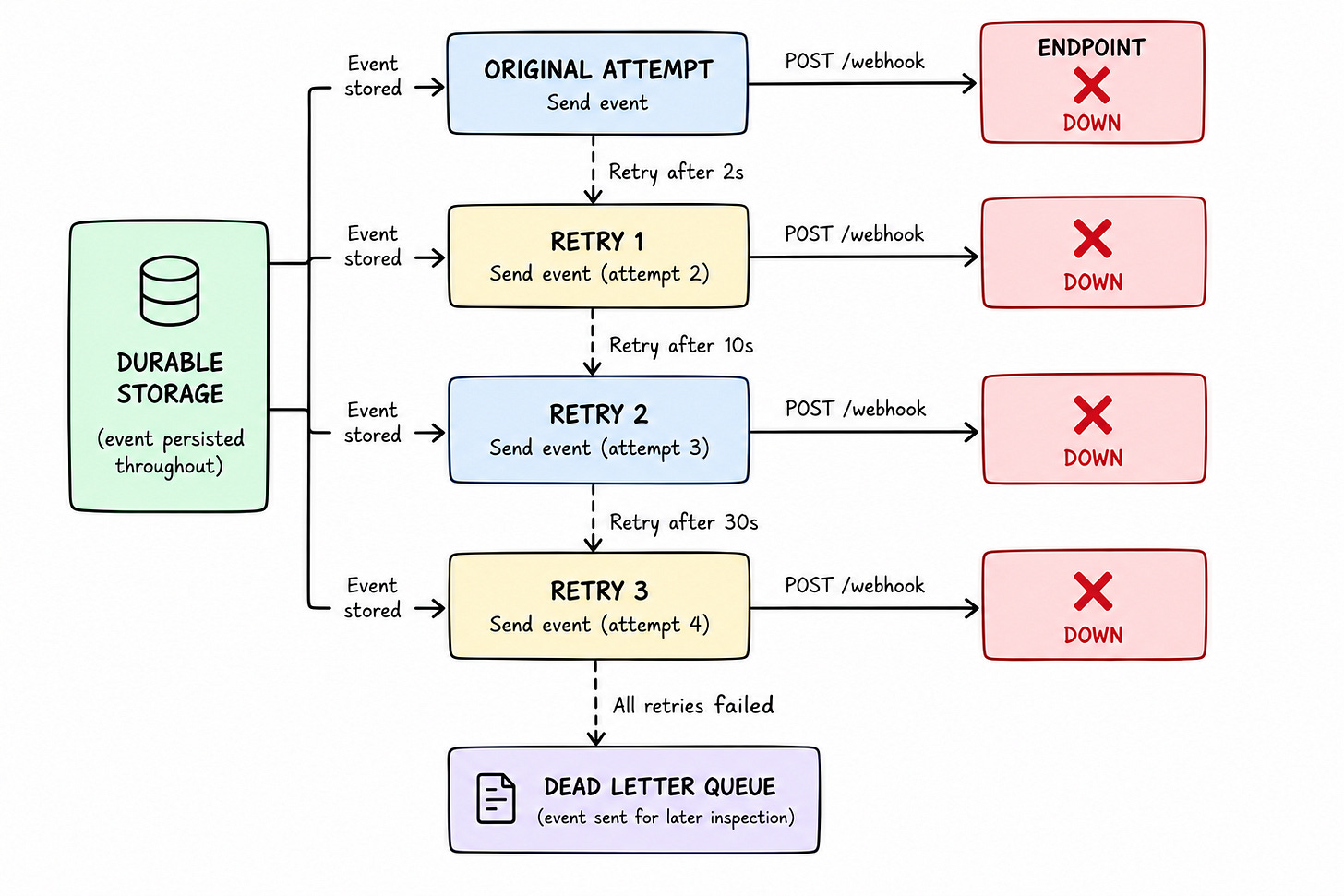
An endpoint could go down during a production deploy…A webhook sent during that window then has nowhere to go.
You send it once and give up, and the event is gone. Whatever depended on it--an agent waiting to continue a workflow, or a customer expecting a receipt--never finds out anything happened at all.
Retries handle this; not by hammering the same failing endpoint over & over.
Each attempt waits a little longer than the last, giving a struggling server time to recover before getting hit again. The event itself needs to sit somewhere durable while all this plays out too, so a crash on the sending side doesn’t erase it along the way.
And if every retry eventually runs out, the event needs somewhere to land instead of vanishing without a trace.
2. Security and Verification
Anyone who has the webhook endpoint’s URL could send a request.
Nothing about the endpoint itself tells the difference between a real event & someone typing curl commands.
This is why legitimate events get signed before they’re sent. The receiving side checks the signature7. A mismatch rejects the event, thus preventing forged events. A timestamp on the request helps prevent an old, legitimate request from being captured & resent later. Also signing secret needs to be managed & rotated over time without breaking existing endpoints.
One risk lies on the sending side instead…
Sending a webhook means requesting a URL provided by someone else. An unchecked URL could point somewhere it should not, such as an internal system instead of a real customer endpoint.
Guarding against it matters as much as verifying what comes in.
3. Idempotency and Duplicate Events
Occasionally, an agent does everything right & still sees the same event twice.
It is NOT a bug. A delivery succeeds at the receiving end, but the confirmation gets lost on its way back to the sender. The sender has no way to know the event actually landed, so it tries again, and the same event arrives twice.
For most systems, a duplicate log entry is harmless.
Yet for an agent taking real action, it isn’t. Processing the same payment confirmation twice can mean sending a receipt twice, or worse, acting on the same instruction twice. A stable ID attached to every event, unchanged across every retry, lets the consumer tell the difference.
See the same ID again, skip it & move on.
4. Backpressure, Traffic Bursts, and Isolation
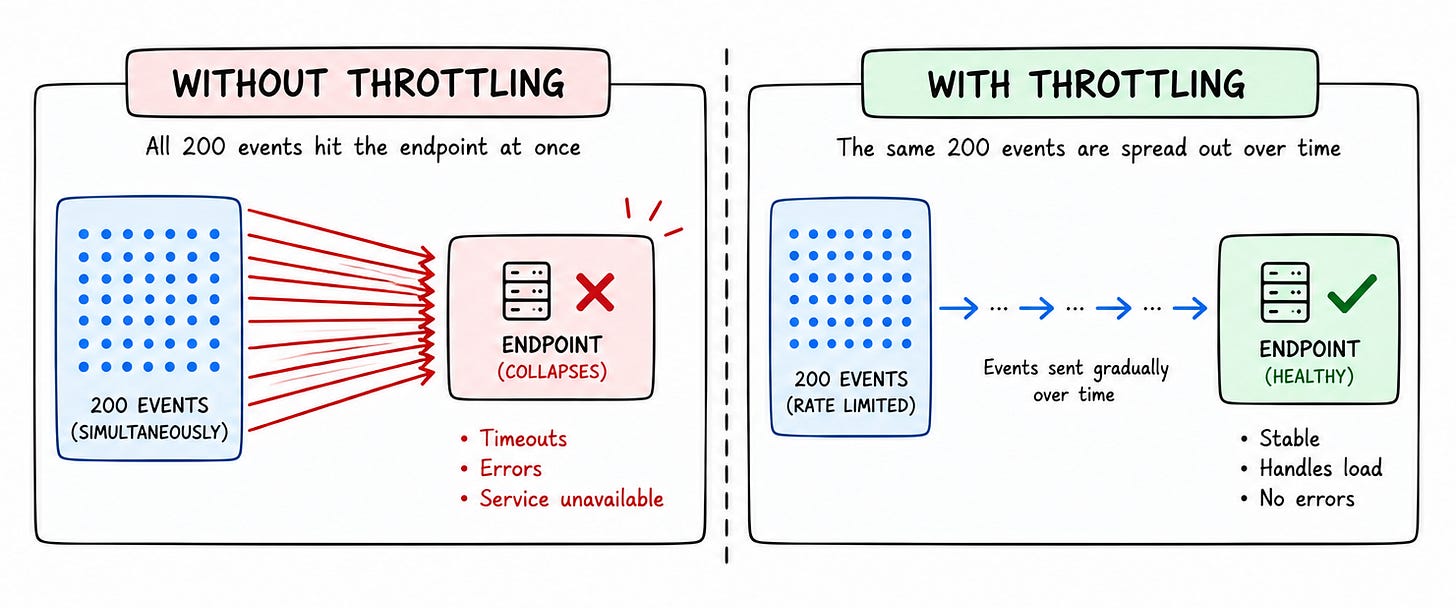
Two hundred events landing over an hour looks nothing like two hundred events landing in the same second.
Agents create this kind of burst when they run many tasks in parallel.
An agent could start 200 tasks at once. If many finish around the same time, they could generate a burst of completion events instead of a steady stream.
A slow-responding endpoint quickly becomes a bottleneck.
Deliveries pile up, and the backlog can spread into the rest of the system. Throttling8 keeps this contained by limiting how fast events go out to any one destination.
Plus, isolating each endpoint from the others matters just as much, so a single customer’s bad day never becomes everyone else’s.
5. Event Ordering
Two letters mailed on the same morning don’t always arrive in the order they were sent…One gets held up somewhere, and the other doesn’t.
Webhook events work the same way.
Update a subscription, then cancel it a moment later. The update event might fail and get retried while the cancellation goes through immediately. The cancellation shows up first. An agent would assume events always arrive in order. If an update arrives late, it’ll process it last and believe a canceled subscription is still active.
Consumers shouldn’t assume events will always arrive in order.
Handling this well means checking each event’s timestamp/version number before acting. This is safer than trusting the order in which events arrive. When strict ordering matters, you can enforce it by controlling how events get processed.
This could add latency & delay later events.
6. Observability and Recovery
When a customer says an agent never responded to their approval, what’s the actual answer?
Without logging, there isn’t one. Nobody can say whether the event got sent, whether it arrived, or what happened after. A working system tracks every delivery attempt, the response it got, and each endpoint's current status.
This turns a vague complaint into something checkable, an exact record of when an event went out, what came back, and how many times it was retried. And once whatever broke gets fixed, replay9 sends the same event again, closing the gap instead of leaving it there permanently.
Delivery, security, duplicates, bursts, ordering, visibility (and so on) need someone to solve each of these. You can build them yourself or use existing standards and infrastructure to handle the pieces you don’t want to own.
Let’s look at what a production-ready webhook needs to provide…
What Real-Time AI Agents Need to Stay Reliable
You still need to handle all these problems when you put a real-time agent into production.
You need a consistent way to identify events, verify their source, and make sure old requests can’t be reused.
This is where standard webhooks help. It gives you a common way to handle the security and verification side of webhook delivery, instead of having to define your own format and rules.
Let’s start with how a webhook gets identified & verified...
Webhook Identity and Signatures
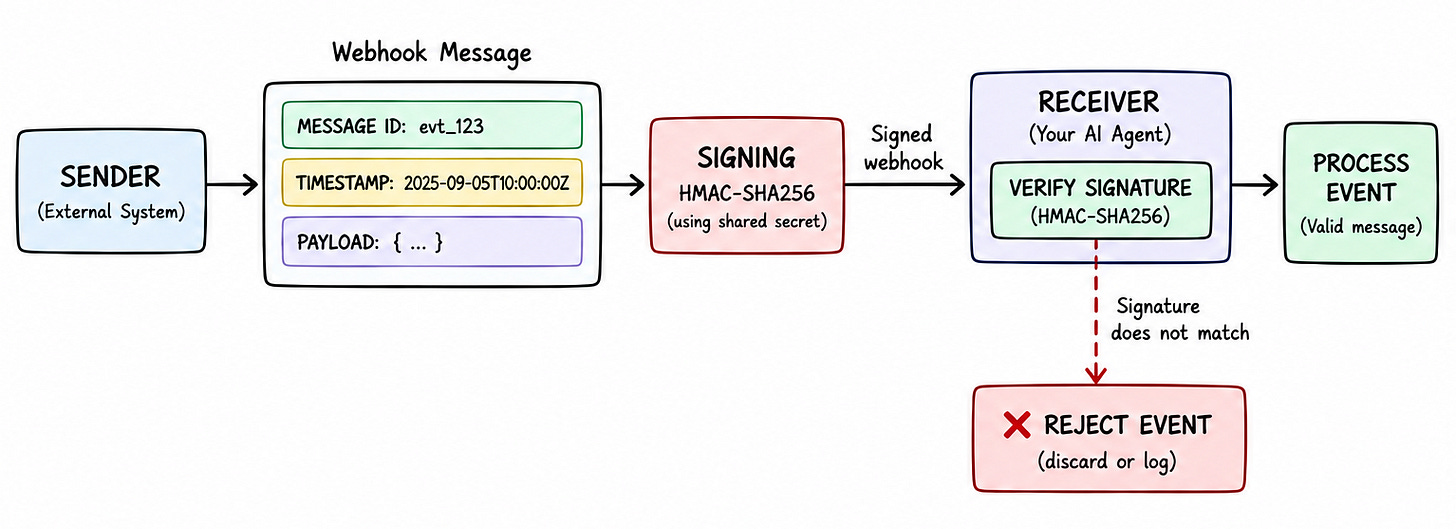
Every webhook carries a unique message ID, a timestamp showing when it was sent, and a signature that verifies its authenticity.
The signature itself uses HMAC-SHA256
It runs over the ID, timestamp, and raw payload together, using a secret known only to the sender and receiver. If you change even one character in the payload, then the signature no longer matches.
A receiver uses the same verification logic for any provider following the standard.
For an agent workflow, this means the application could verify an event before allowing it to trigger another action.
Replay Protection and Key Rotation
A valid signature proves a request came from the sender…yet it doesn’t prove the request is new…
Without a timestamp check, someone who captures a real request could resend it days later, and the signature would still pass. The receiver could enforce an acceptable timestamp window This ensures a captured request eventually stops being usable.
Also secrets need to change occasionally, and a receiver still verifying against the old one shouldn’t break during the transition. The spec supports multiple signatures during secret rotation. This lets a receiver verify requests using either the old/new secret during the rotation window.
For an agent workflow, this matters when an event could trigger an action.
An old signed request shouldn’t be accepted as a new event just because its signature is still valid.
Standardized Webhook Format
A provider following the standard uses the same headers & signing format.
Consumers could use one verification implementation across providers.
This is what makes interoperability possible. A team building a receiver can use one verification path for events from different providers. There is no need to write custom logic for each one.
Related articles
Introduction to Load Balancing
Discover how load balancing distributes traffic across servers, explore popular algorithms like Round Robin and Least Connections, and learn how they improve scalability and reliability.
Scaling Payment Systems: Architecture Patterns
Explore proven architecture patterns for building reliable, scalable payment systems that handle high traffic, failures, and transactions securely.